In the beginning of my career I worked as an identity designer. Gradually I moved into digital products as a “visual designer,” where I worked alongside an information architect that would spec out wireframes. Later, when the industry collapsed expectations of both roles into the “product designer,” designers still worked from low to high fidelity.
There was a natural, sequential process of design artifacts moving from whiteboards or wireframes (low fidelity) to pixel perfect mockups and interactive prototypes (high fidelity). Producing high fidelity used to take time, attention, and effort, and now it requires much less.
Now, we (and our PMs) can generate a realistic prototype in minutes. The designer’s focus must shift from the old process to one that communicates at the right abstraction for decision making. So how should we use fidelity in an AI-native world?
Benefits of fidelity
Pre-AI, fidelity often advanced with problem definition.
Definition is how clearly a team understands the problem and its chosen direction. Whether the process started from an existing flow or a blank canvas, the slower design production process gave teams time and space to reflect together. This enabled shared understanding and alignment.
Fidelity also minimized risk for the business. Code was expensive; therefore the business needed conviction a design was “validated” before building. High fidelity experiences communicated a concrete vision before an expensive team of engineers began reproducing it. Critically, stakeholders could sign off on an approved version of the experience to demonstrate a shared alignment.
AI-native pitfalls
Now I am seeing a pattern on AI-native teams: they start in high fidelity prototypes. They often skip over problem definition work.
They prefer to generate another iteration instead. The teams run into issues of misalignment, delays, and churn. They spend time untangling assumptions by working backwards from each other’s proposed solutions. Teams anchor to early solutions without sufficiently considering option breadth. The assumptions underneath are untested while the prototype looks complete and polished.
Generating detail is now incredibly easy with AI, but evaluating has become the bottleneck. Simply producing more prototypes in high fidelity does not speed up your team’s alignment on what matters. After being on the barrel-end of enough “slop cannons,” I’ve realized receiving more high fidelity AI outputs is liable to introduce more confusion than clear direction.
The solution: use fidelity deliberately to increase clarity.
User flows, storyboards, sketches, whiteboards, and wireframes remain useful in an AI-native design process. Low fidelity enables your team to move at high velocity by focusing on the right problems while trusting that the details can be filled in later. High fidelity is useful when you need reviewers to feel like the product is real. The key is considering fidelity as a design tactic, and apply it to the most impactful problems.
Shaping the work
Low fidelity can keep exploration focused and enable you to fill in the details later. A practical use of low fidelity comes from Ryan Singer’s book on product development, Shape Up.
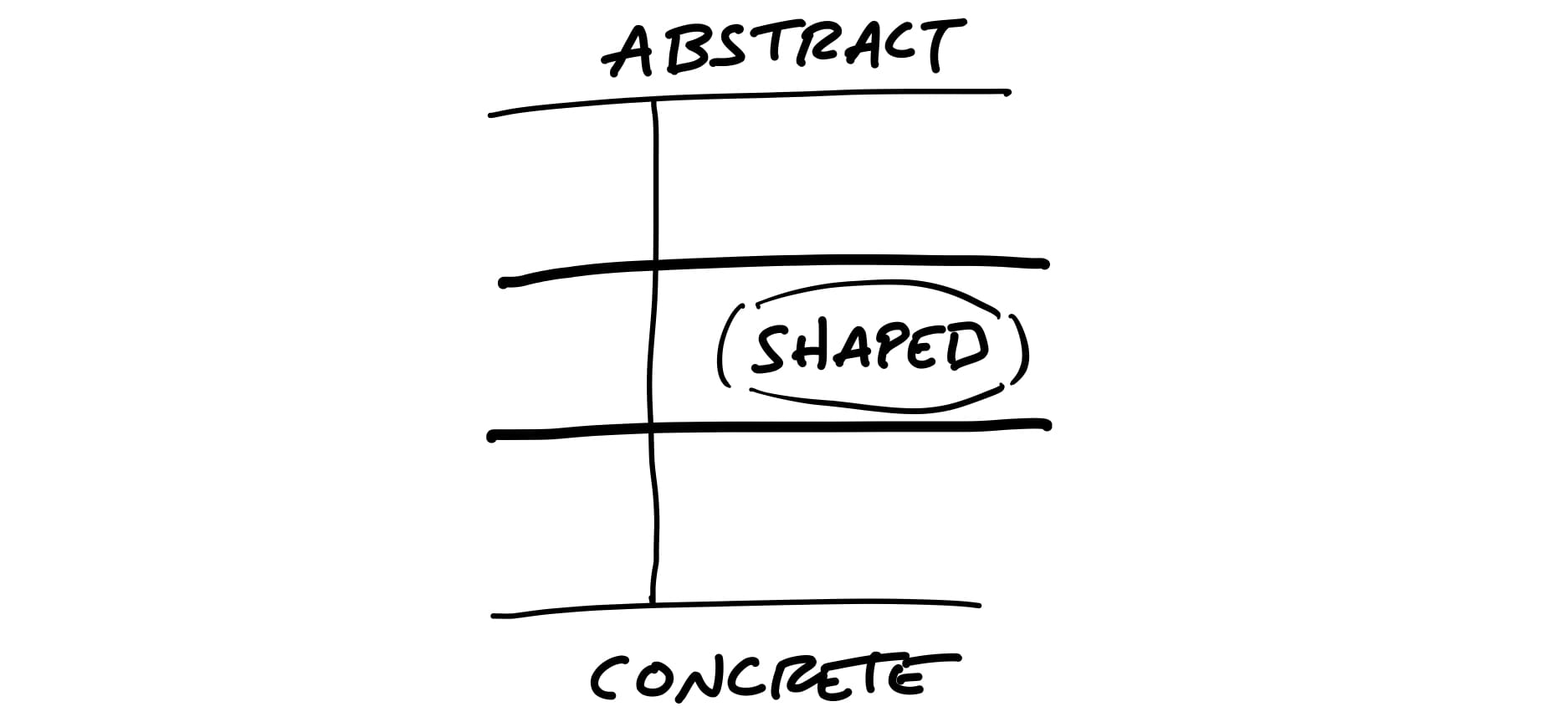
When we shape the work, we need to do it at the right level of abstraction: not too vague and not too concrete. Product managers often err on one of these two extremes.
Ryan describes the issue of developing concrete (ie, high fidelity) artifacts too early as “leaving no room for creativity”. We can interpret this through the psychological effect of anchoring: subsequent decisions are influenced by an initial reference. When you anchor too early, there is opportunity cost of finding more creative and innovative ideas, and direct costs of time and energy overcommitting to the wrong direction.
Deliberate use of low fidelity helps you fight the anchoring effect in two ways.
First, use of low fidelity keeps focus on the most important aspects of the problem. When a sculptor works on a clay model, they add material to ensure the structural form is clear before introducing details like facial expression or muscle tone.
Second, working at low fidelity keeps idea generation and evaluation cheap. Extraneous details without clear framing will distract your team and waste time. Anticipate the evaluation bottleneck by intentionally reducing the amount of elements to evaluate.
Decide the fidelity you’ll work at based on what you must decide or learn. If you want to compare high level journeys, then a user flow or storyboard can suffice. Judging whether a new experience is compelling may require a rich interactive prototype to evaluate.
Futurecasting
Another method of deliberate fidelity is from the tradition of speculative design. The purpose is to explore plausible “futures” with tangible objects, often related to decisions we make in everyday life.
Here is an example of an electric motorcycle which eschews historical design references, demonstrating how narrow the visual design vocabulary of motorcycles has become. The fidelity is high enough to engage the observer and persuade them. It looks and feels real, yet is unusual enough to make the argument provocative. The goal is not to design a ready-to-manufacture motorcycle, but to challenge the existing ideas of what a motorcycle is supposed to look like.
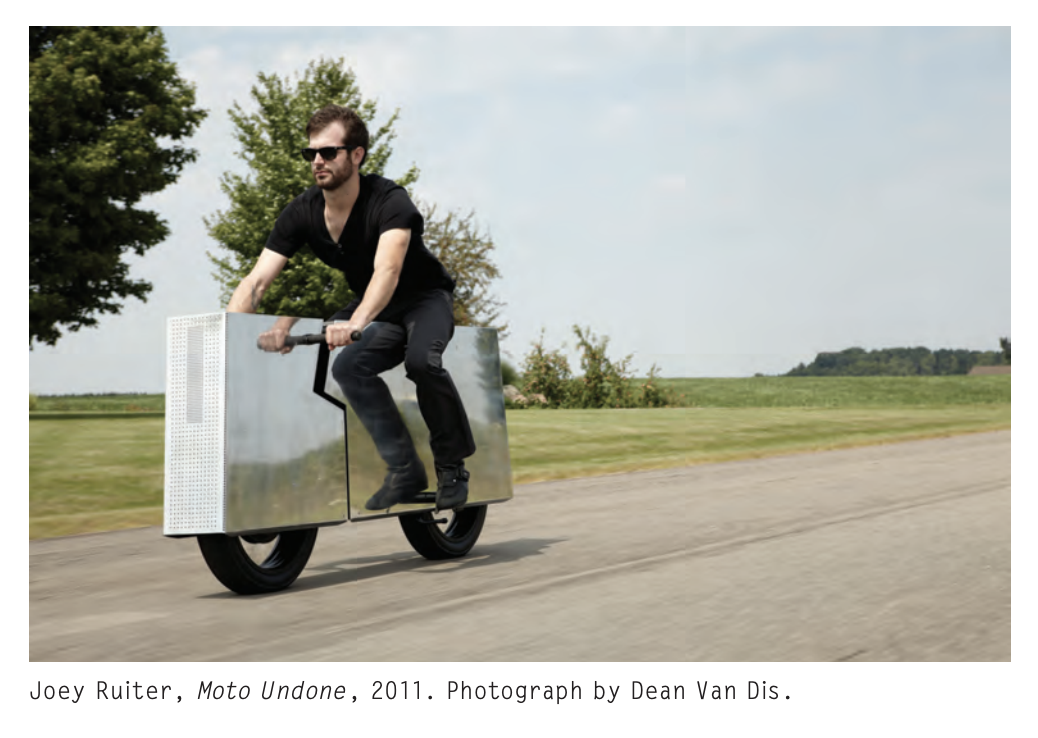
For software product design, high fidelity helps us deliver blueprints as well as concept cars. In many cases we use the same tools for both. Excellent designers have always helped organizations think beyond what’s possible today. The ones I have worked with know that high fidelity is table stakes to create a convincing concept, so they challenge other conventions to pitch their vision. Use fidelity as a tool to create possible “futures” that look and feel real. Push your team to be more ambitious than what they are considering today.
A deliberate use of design fidelity helps you communicate ideas at the right abstraction. When teams default to a high fidelity approach with an unclear problem or framing, teams waste time debating details before aligning on a direction. Before generating your next prototype, prioritize what you need to decide or learn, and choose the right fidelity.